
Order Cancellation Rules & Restocking Fees
Let customers cancel orders when appropriate, prevent unnecessary chargebacks, and recover costs using smart cancellation rules and restocking fees.
Why This Matters
Order cancellations are inevitable — but uncontrolled cancellations lead to lost revenue, inventory issues, and support overhead.
Account Editor lets you:
- Allow customer-initiated cancellations when it makes sense
- Block cancellations when fulfillment has started
- Apply restocking fees automatically
- Maintain full visibility in the Shopify order timeline
1. Enable Customer Order Cancellations
When enabled, customers can cancel eligible orders directly from the order editing interface.
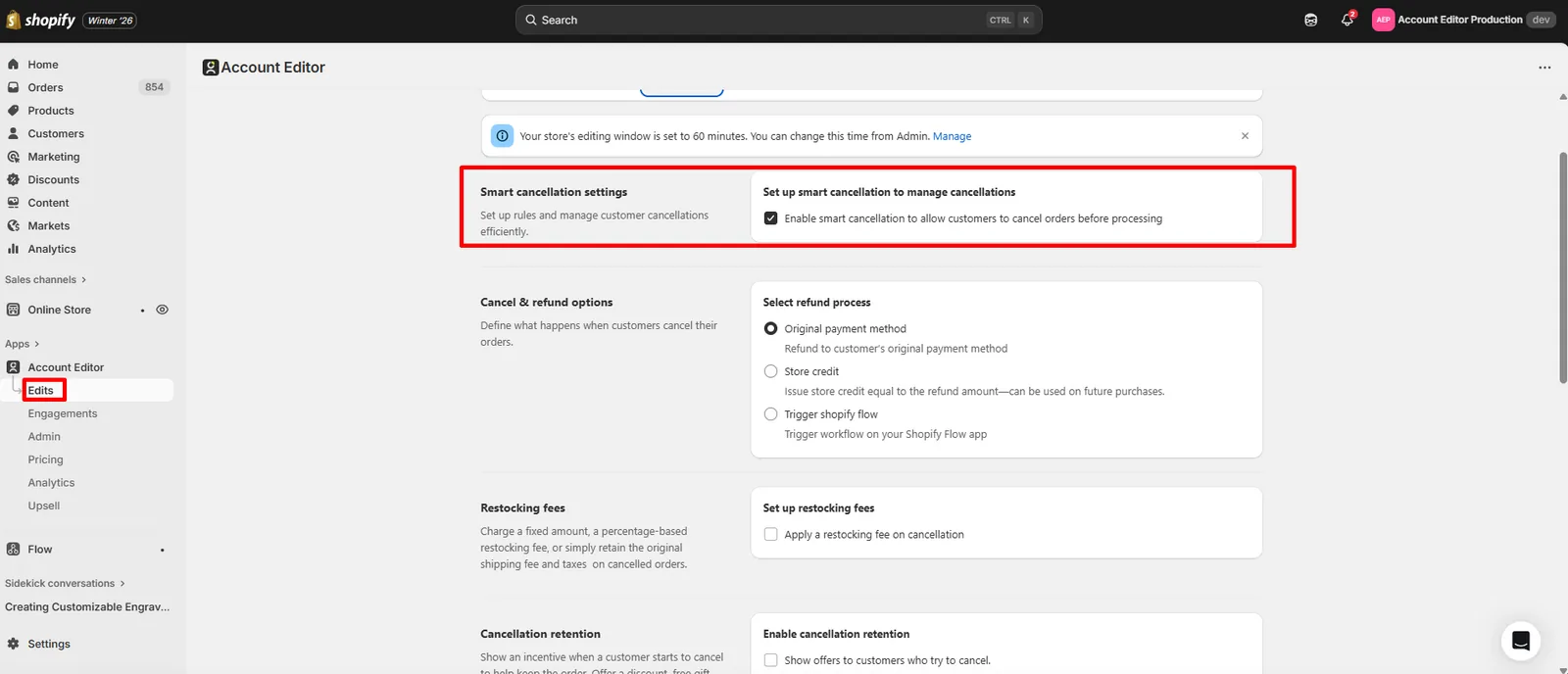
What this does
- Removes the need for support tickets
- Prevents manual refunds
- Gives customers instant resolution
2. Cancellation Eligibility Rules
Cancellation availability depends on order state and your settings.
Unfulfilled orders
- Cancellation allowed (if enabled)
- Restocking fee can be applied
- Refund method follows your configuration
Partially fulfilled orders
- Cancellation blocked
- Reason: fulfilled items cannot be reversed safely
Fully fulfilled orders
- Cancellation disabled
- Customers see Contact Support or Reorder options only
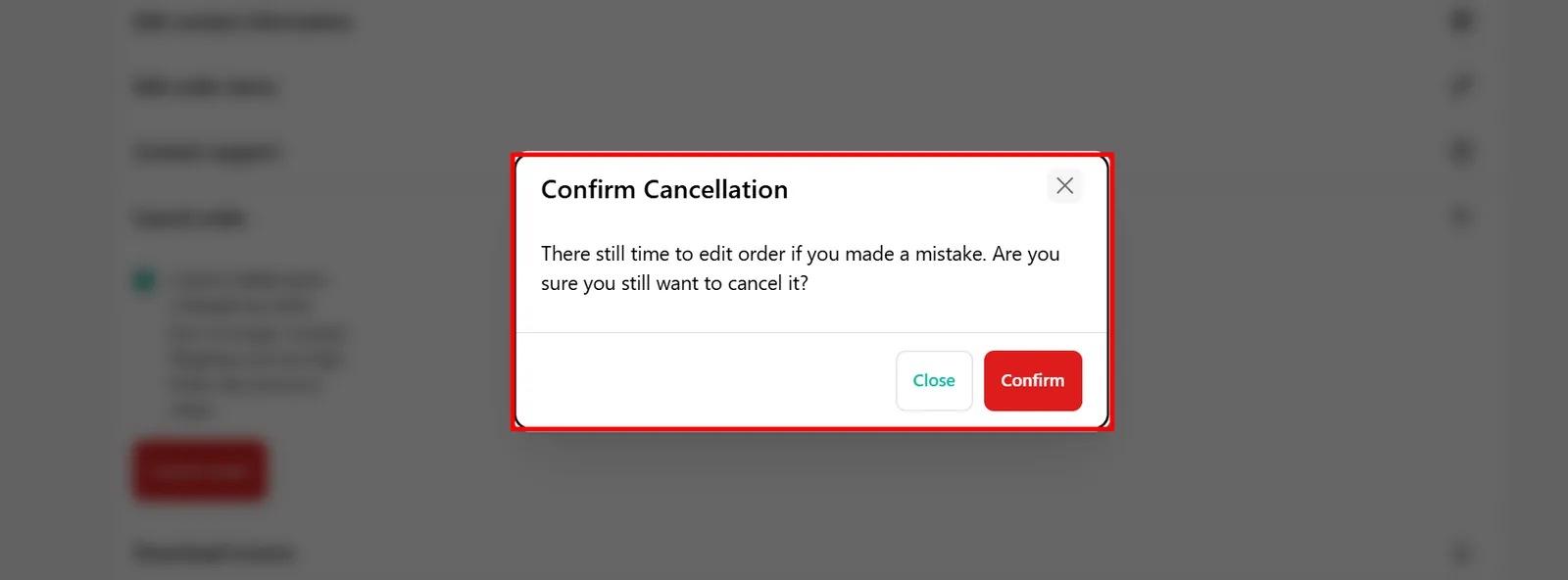
3. Apply Restocking Fees on Cancellations
Enable restocking fee
When enabled, Account Editor can automatically deduct a restocking fee when an order is cancelled.
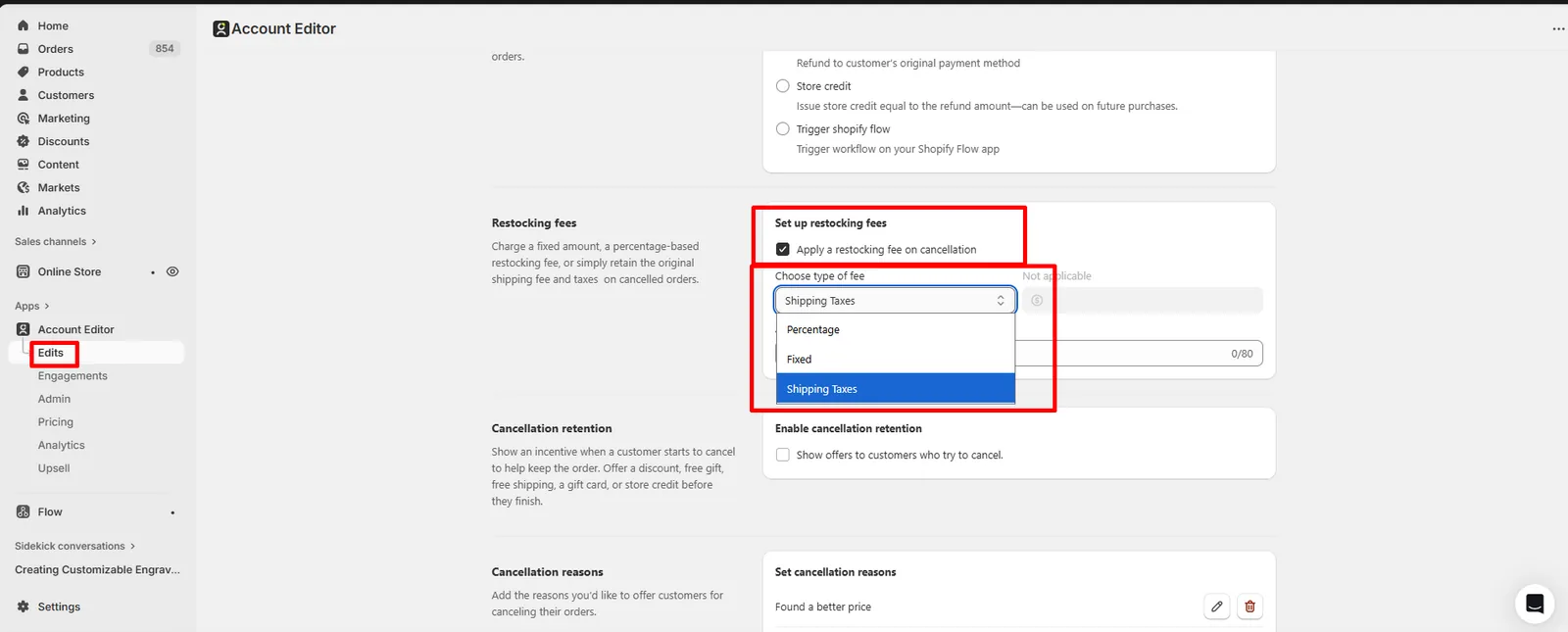
Restocking fee options
- Percentage-based fee
- Fixed amount
- Fee applied before refund is issued
Common use cases
- Packaging & handling costs
- Payment gateway fees
- Inventory handling
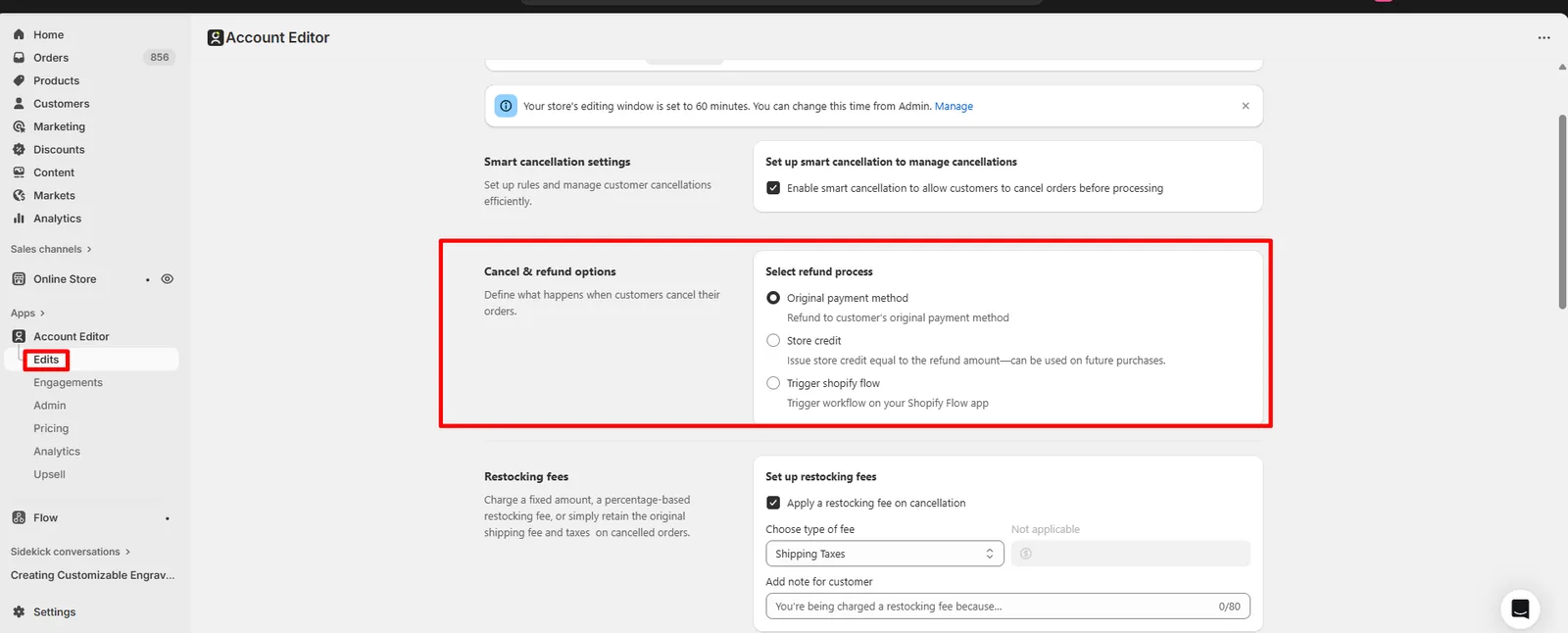
4. How Refunds Are Processed
When an order is cancelled:
- Shopify handles refund processing
- Refunds follow the original payment method
- Refund timing depends on the payment gateway
- Account Editor records the cancellation action
Refund logic can be customized based on your internal workflows.
Cancellation Retention (Prevent Lost Orders)
Cancellation Retention helps you save orders before they are cancelled by showing an incentive when a customer attempts to cancel. Instead of losing the order, you can offer value and keep the customer.
Enable Cancellation Retention
When enabled, customers who click Cancel Order will see a retention offer before the cancellation is completed. Supported retention offers include:
- Discount
- Free gift
- Free shipping
- Gift card
- Store credit
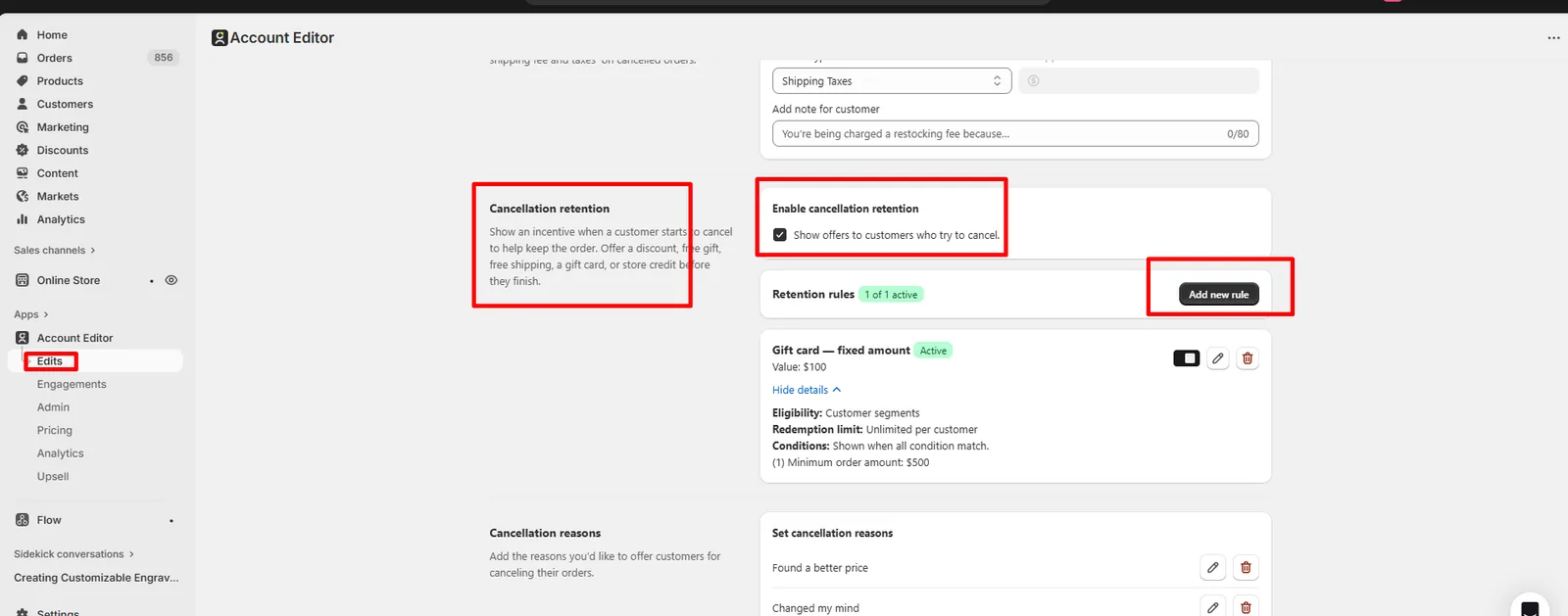
Retention Rules
Retention offers are controlled using rules, similar to upsell targeting. Each rule defines:
- Offer type (e.g. gift card, discount)
- Offer value
- Eligibility
- Conditions
Example: Gift Card Retention Rule
- Offer type: Gift card (fixed amount)
- Value: $100
- Eligibility: Customer segments
- Redemption limit: Unlimited per customer
- Conditions:
- Minimum order amount: $500
The offer is shown only when all conditions match.
When Retention Offers Are Shown
Retention offers appear:
- When a customer starts the cancellation flow
- Before the order is actually cancelled
- Only if the rule conditions are met
If the customer accepts the offer:
- The cancellation is stopped
- The order remains active
- The incentive is applied automatically
Cancellation Reasons
You can ask customers why they want to cancel, helping you understand cancellation patterns. Default reasons can include:
- Found a better price
- Changed my mind
- Item no longer needed
- Shipping cost too high
- Order was incorrect
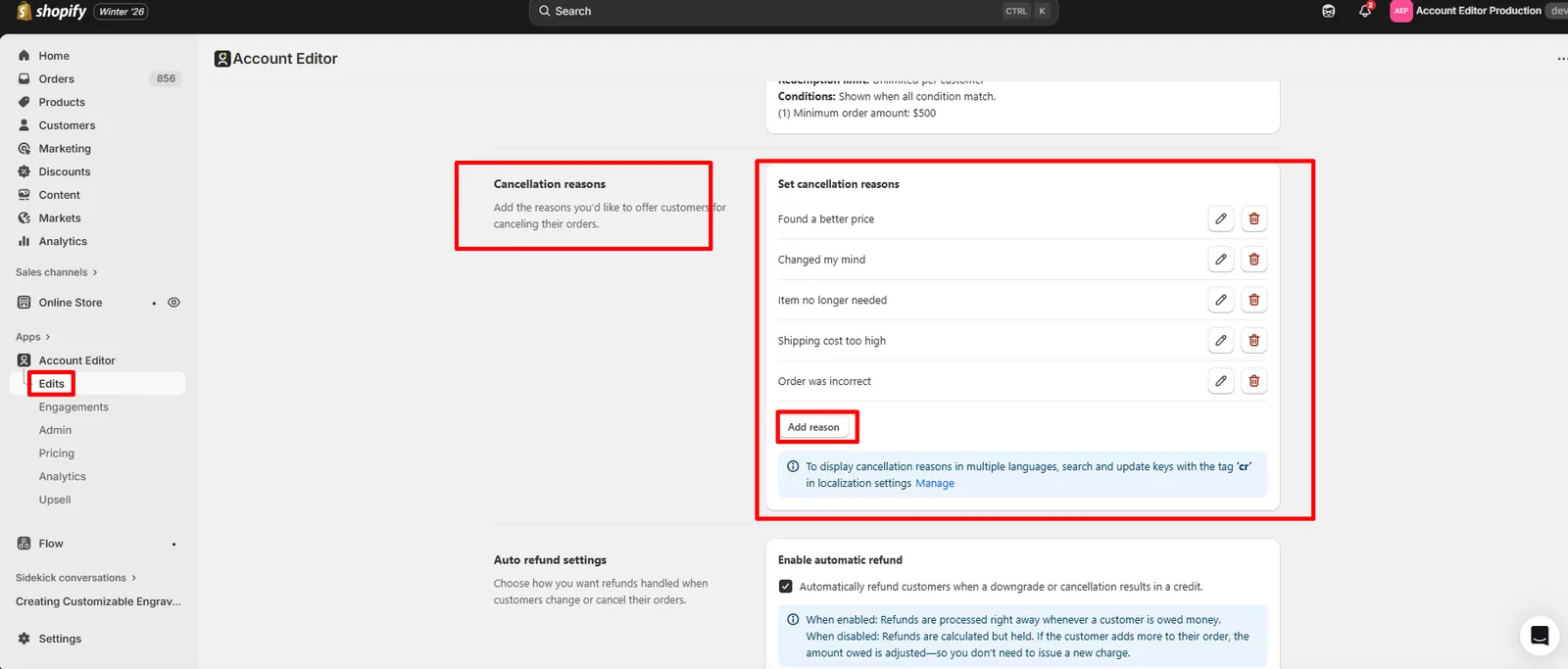
Multi-language support
To translate cancellation reasons:
- Search localization keys using the tag
cr - Update translations in Language & Localization Settings (ONLY FOR SILVER AND GOLD PLAN)
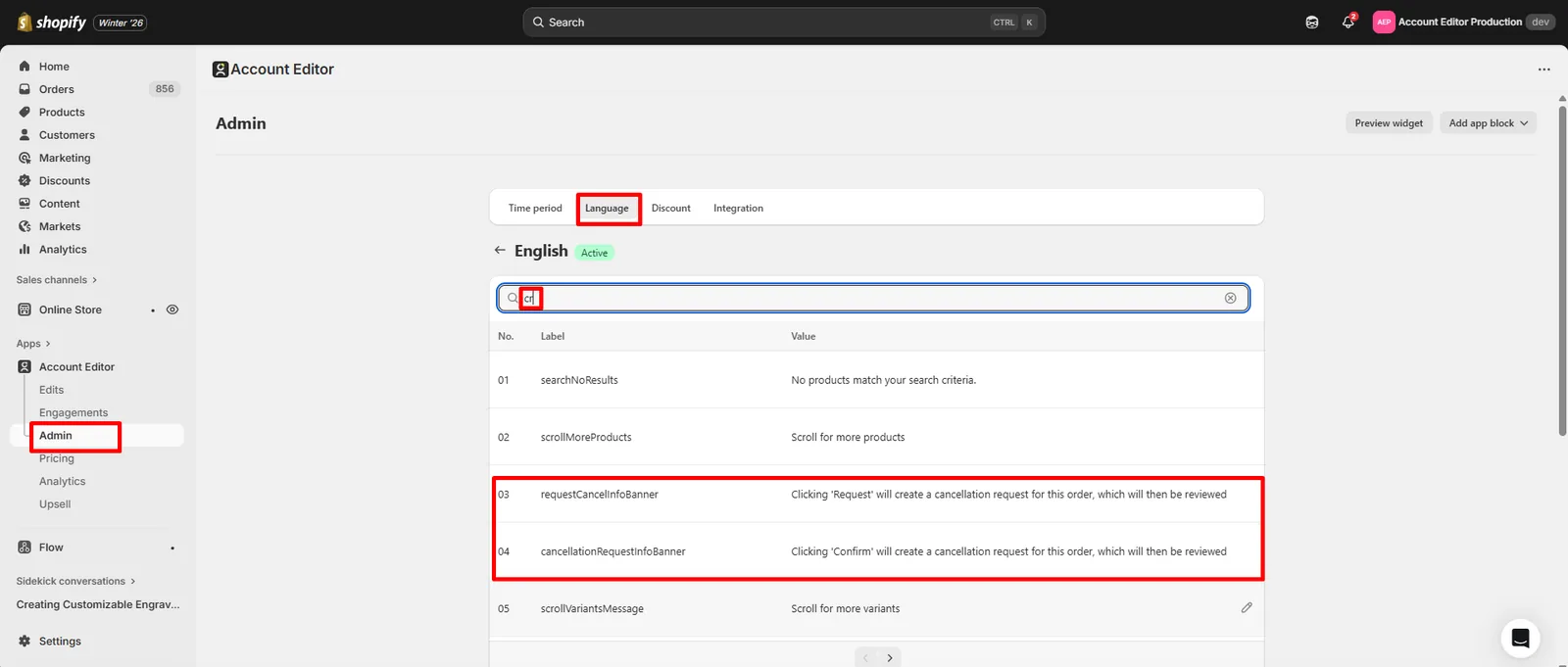
Auto Refund Settings
Control how refunds are handled when customers downgrade or cancel orders.
Enable Automatic Refund
When enabled:
- Refunds are processed immediately
- Customers are refunded as soon as a credit is created
- No manual action required
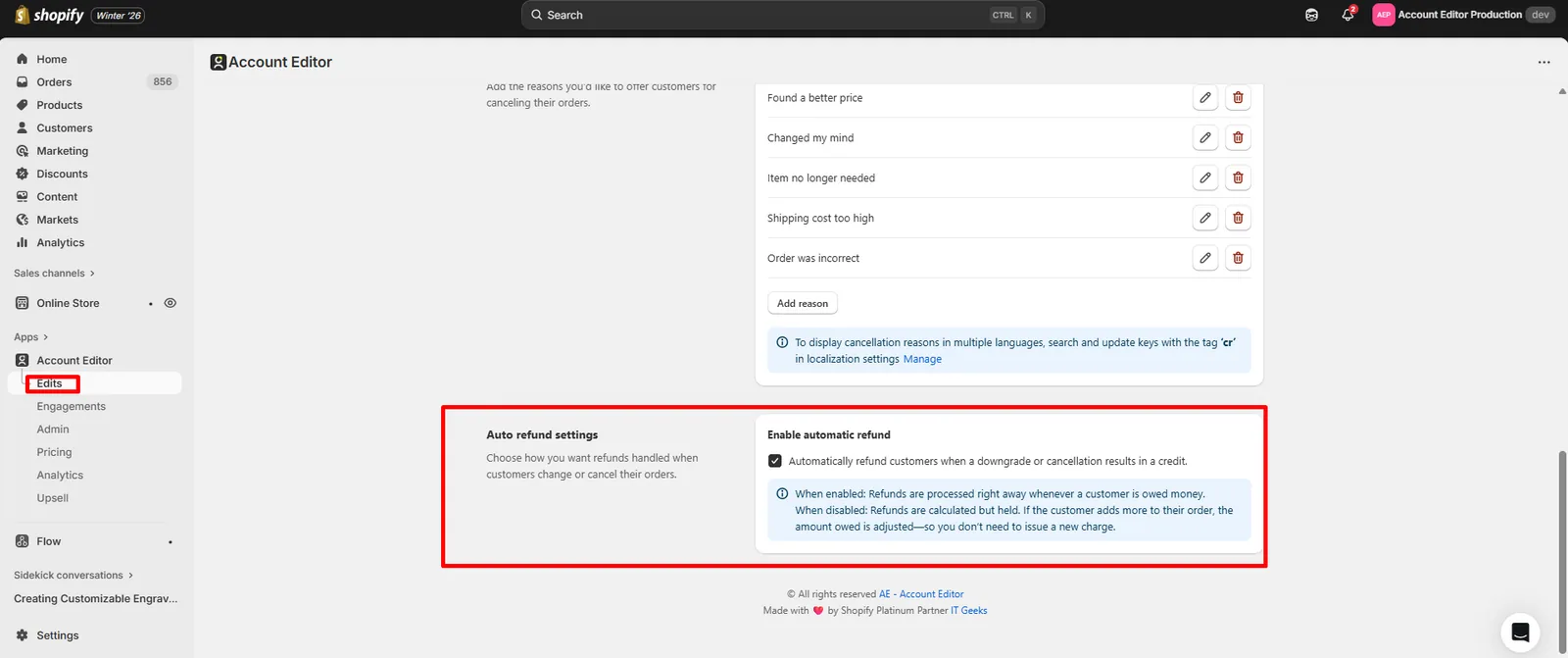
Automatic Refund Disabled
When disabled:
- Refunds are calculated but held
- Credits are stored temporarily
- If the customer adds items later, the credit is adjusted automatically
- Helps avoid multiple charges and refunds
This is useful when:
- Customers frequently modify orders
- You want to encourage retention or upsells after changes
Best Practice
- Enable Cancellation Retention to reduce lost revenue
- Use minimum order value conditions to protect margins
- Enable automatic refunds for fast resolution
- Disable auto-refunds if customers often continue editing orders.
5. Taxes, Shipping & Discounts on Cancellation
When an order is cancelled:
- Taxes are reversed automatically by Shopify
- Shipping charges are refunded based on Shopify rules
- Discounts are reversed or adjusted automatically
Account Editor does not override refund calculations — Shopify remains the source of truth.
6. Product Types & Special Cases
A. Bundles
- Cancelling a bundle cancels all included components
- Restocking fee applies to the bundle total
- Partial bundle cancellation is not allowed
B. Subscription Products
- Cancellation rules depend on the subscription app
- Some subscription orders may block cancellation
- Account Editor respects subscription locks
C. Digital Products
- Cancellations Available
D. Pre-orders
- Usually cancellable until fulfillment
- Refund behavior depends on deposit rules
7. Real Merchant Scenarios
Scenario A — “Customer cancelled immediately after checkout”
Result: Order cancelled → restocking fee applied → refund processed automatically.
Scenario B — “Customer cannot cancel order”
Possible causes:
- Order already fulfilled
- Cancellation disabled in settings
- Subscription app restriction
- Cancellation disabled using Shopify Flow
Scenario C — “Refund amount looks different”
Cause: Restocking fee or gateway fee deducted. Result: Expected behavior.
8. Recommended Setup (Best Practices)
- Enable cancellation only for unfulfilled orders
- Apply restocking fees to reduce abuse
- Disable cancellation after fulfillment
- Clearly communicate cancellation rules to customers
- Monitor cancellation analytics regularly
9. FAQs
Can customers cancel orders after fulfillment?
No — Shopify does not allow cancellation of fulfilled orders.
Can I charge a restocking fee automatically?
Yes — enable restocking fees in Account Editor settings.
How is the refund issued?
Shopify processes refunds using the original payment method, Shopify Flow And Store Credit too.
Can I disable cancellations completely?
Yes — you can turn off customer-initiated cancellations.
10. Common Issues & Fixes
| Issue | Cause | Fix |
|---|---|---|
| Cancel option not visible | Order fulfilled / disabled | Expected behavior |
| Refund amount lower | Restocking fee applied | Expected behavior |
| Cancellation failed | Payment gateway error | Retry or contact gateway |
| Subscription order not cancellable | App lock | Check subscription rules |