
Address Editing (Suggestions, Validation & Restrictions)
Allow customers to update their shipping address after checkout to prevent delivery failures, reduce reshipments, and avoid manual support requests
Why This Matters
Incorrect shipping addresses are a leading cause of:
- Failed deliveries
- Returned shipments
- Reshipping costs
- Support tickets
Address Editing lets customers fix address mistakes after placing an order, while Account Editor ensures shipping fees and taxes stay accurate based on your store rules.
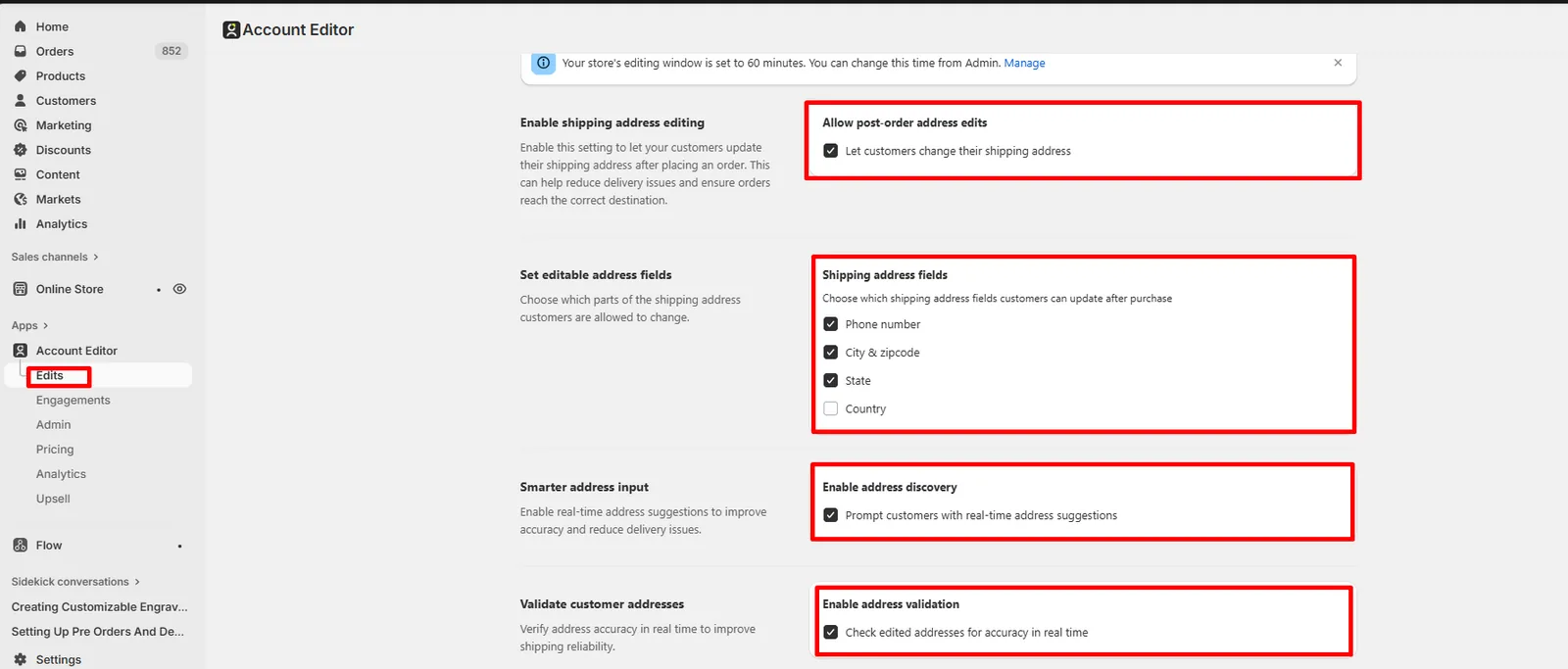
1. Enable Shipping Address Editing
When this setting is enabled, customers can update their shipping address from the order editing interface.
What this does
- Allows post-order address updates
- Prevents delivery issues caused by typos or incomplete addresses
- Reduces the need for manual address changes by staff
Address editing availability depends on your store configuration, fulfillment state, and integrations.
2. Choose Which Address Fields Customers Can Edit
You can control exactly which parts of the shipping address customers are allowed to change.
Editable address fields can include:
- Phone number
- City & ZIP / postal code
- State / province
- Country
This allows you to:
- Permit minor corrections only (e.g. ZIP, phone)
- Or allow full address changes when needed
3. Smarter Address Input (Address Discovery)
Enable address discovery
When enabled, customers are shown real-time address suggestions as they type. Benefits
- Reduces spelling mistakes
- Improves address formatting
- Helps customers select valid delivery addresses
This is especially useful for international orders or complex addresses.
4. Validate Customer Addresses in Real Time
Enable address validation
When validation is enabled, edited addresses are checked for accuracy before saving. What validation does
- Verifies city, state, and postal code combinations
- Blocks invalid or incomplete addresses
- Improves shipping reliability with carriers
Address validation usage limits depend on your plan.
5. Recalculate Shipping After Address Changes
Enable recalculation of charges
When customers update their shipping address:
- Shopify recalculates shipping fees based on the new address
- Zone-based, carrier-based, or profile-based rates are reapplied
- Free-shipping thresholds may trigger or be removed
Account Editor does not override shipping logic — it uses Shopify’s recalculated rates.
6. Recalculate Shipping on Line Item Edits
Enable shipping fee update on line item edits
If enabled, shipping fees will also be recalculated when:
- Items are added
- Items are removed
- Quantities are changed
- Variants are updated
This ensures shipping always reflects:
- Updated weight
- Updated order value
- Updated shipping profile rules
7. Show Split Shipping (Multi-Location Orders)
Enable split shipping
Split shipping appears when:
- Items ship from different locations
- Products belong to different shipping profiles
When enabled:
- Customers can select a shipping method for each shipment
- Shipping is calculated separately per fulfillment group
This is especially useful for:
- Multi-warehouse stores
- Mixed physical + bulky items
- Profile-based shipping rules
8. Allow Customers to Change Shipping Method
Allow shipping method changes
When enabled, customers can:
- Upgrade to faster shipping
- Switch between available shipping options
Shipping method changes trigger:
- Shipping fee recalculation
- Tax recalculation (if enabled)
9. Recalculate Taxes After Address or Shipping Changes
Enable tax recalculation
When enabled, Shopify recalculates tax eligibility after:
- Address edits
- Shipping method changes
- Line item updates
This ensures:
- Correct state / country tax rules
- Accurate totals for cross-border orders
- Compliance with local tax regulations
10. Fulfillment, Integration & Locking Rules
Address editing may be restricted or blocked when:
- A 3PL or OMS has already synced the order
- The fulfillment workflow locks the order
- External systems override Shopify updates
In such cases:
- Customers may see address editing disabled
- Changes may not sync to external systems
See Integration Troubleshooting for details.
11. Real Merchant Scenarios
Scenario A — “Customer fixed a ZIP code typo”
Result: Address validated → shipping recalculated → order updated successfully.
Scenario B — “Customer changed country and shipping price changed”
Cause: New shipping zone applied. Result: Shopify recalculated shipping correctly.
Scenario C — “Customer sees split shipping”
Cause: Products ship from different locations or profiles. Result: Customer selects shipping method per shipment.
Scenario D — “Address updated but 3PL shipped old address”
Cause: External system synced before edit. Fix: Adjust fulfillment delay or integration rules.
12. Recommended Setup (Best Practices)
- Enable address editing for post-checkout corrections
- Enable address discovery + validation
- Enable shipping & tax recalculation
- Enable split shipping for multi-location stores
- Allow shipping method upgrades when applicable
- Review 3PL sync timing carefully
13. FAQs
Can customers change their shipping address after checkout?
Yes, if address editing is enabled and the order is not locked by fulfillment or integrations.
Why did shipping or tax change after editing the address?
Shopify recalculated rates based on the updated address.
Can I restrict which address fields customers can edit?
Yes — you can choose specific editable address fields.
Why is address editing disabled for some orders?
The order may be locked by fulfillment status or a third-party system.
14. Common Issues & Fixes
| Issue | Cause | Resolution |
|---|---|---|
| Address edit disabled | Order locked | Expected behavior |
| Shipping price changed | New zone/profile | Shopify recalculation |
| Split shipping shown | Multiple locations | Expected behavior |
| 3PL ignored address change | Early sync | Adjust integration timing |