
Editing Eligibility & Restrictions (Subscriptions, Bundles, Product Types)
Control exactly which orders, products, and items customers can edit after checkout—so edits stay safe, accurate, and compatible with your fulfillment, pricing, and integrations.
Why This Matters
Not every order or product should be editable after checkout.
Eligibility & Restrictions let you:
- Prevent edits that would break pricing, discounts, or fulfillment
- Respect Shopify and third-party app limitations
- Reduce failed edits and support tickets
- Keep editing flexible where it’s safe—and blocked where it’s not
1. How Editing Eligibility Works
Before showing edit options, Account Editor checks:
- Order status (unfulfilled, partially fulfilled, fulfilled)
- Product type (bundle, subscription, digital, gift card)
- App locks (subscription apps, bundle apps, 3PLs)
- Your restriction settings (tags, product types, collections)
- Shopify platform limitations
2. Order Status Restrictions
Unfulfilled orders
- Editing allowed (based on settings)
- Items, address, shipping, and cancellations may be available
Partially fulfilled orders
- Editing Blocked even if one line item is fulfilled manually
- Fulfilled items are locked automatically
Fully fulfilled orders
- Editing disabled
- Customers see Download Invoice, Contact Support, or Reorder
3. Bundles (Native & Third-Party)
Native Shopify Bundles
- Bundle components cannot be edited individually
- Quantity change applies to the entire bundle
- Variant swaps inside a bundle are blocked
- Pricing and discounts are bundle-level → editing components would break totals
Recommendation: Restrict editing for bundle SKUs using product type or tags.
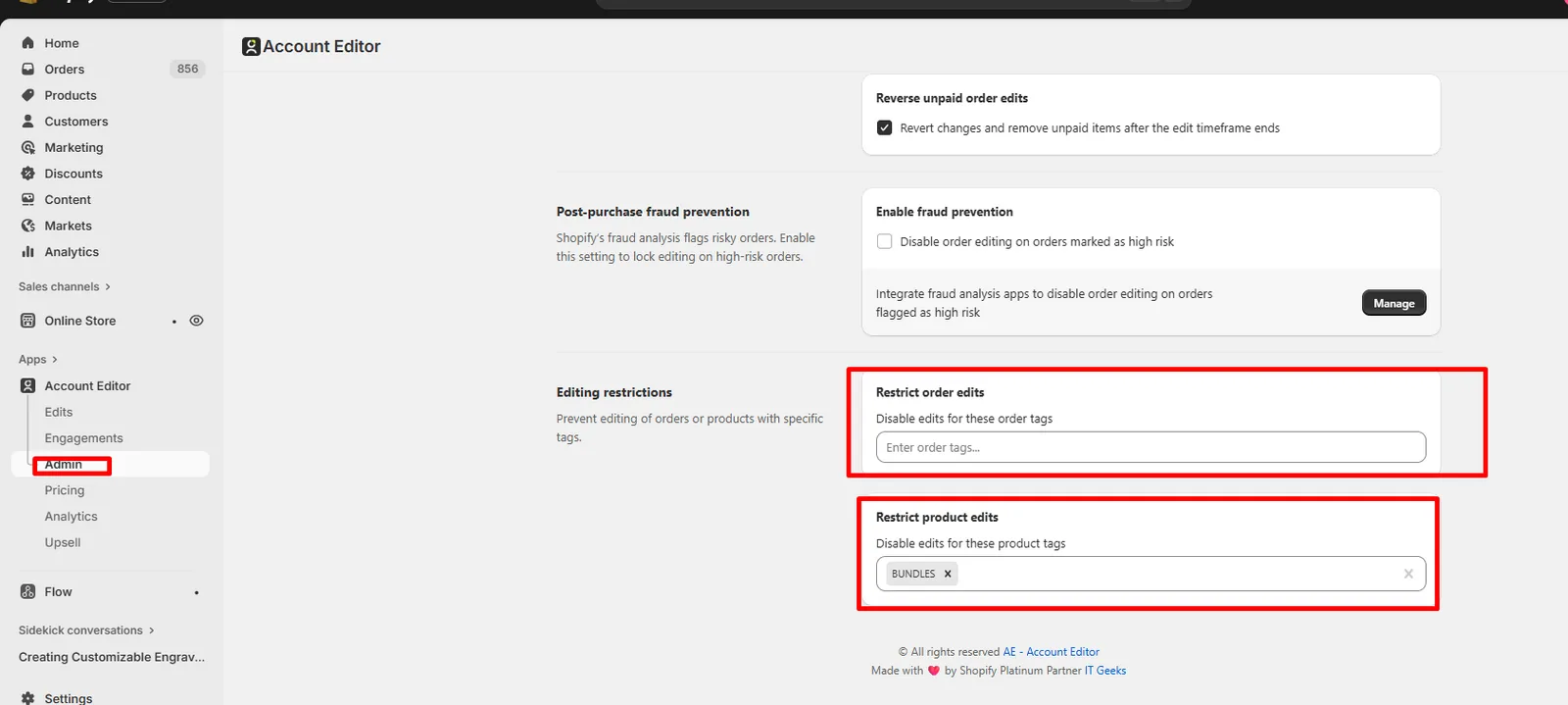
If Bundle is restricted using tag and tag is added inside Account Editor restrict product then:
- Customer would not be able to break bundle ensuring bundle safety.
- Customer can add individual bundle item but would not be able to add bundle.
- Customer can edit , change variant , swap do all other edit with Bundle Order.
What Customers Can't do With Bundle Orders:
- Add another Bundle with tag inside Account Editor Product restrict .
- Remove Existing Bundle.
Third-Party Bundle Apps
(Revy, FastBundle, WideBundle, PickyCart, etc.)'
Best practice: Restrict editing for bundle SKUs created by third-party apps.
4. Subscription Products
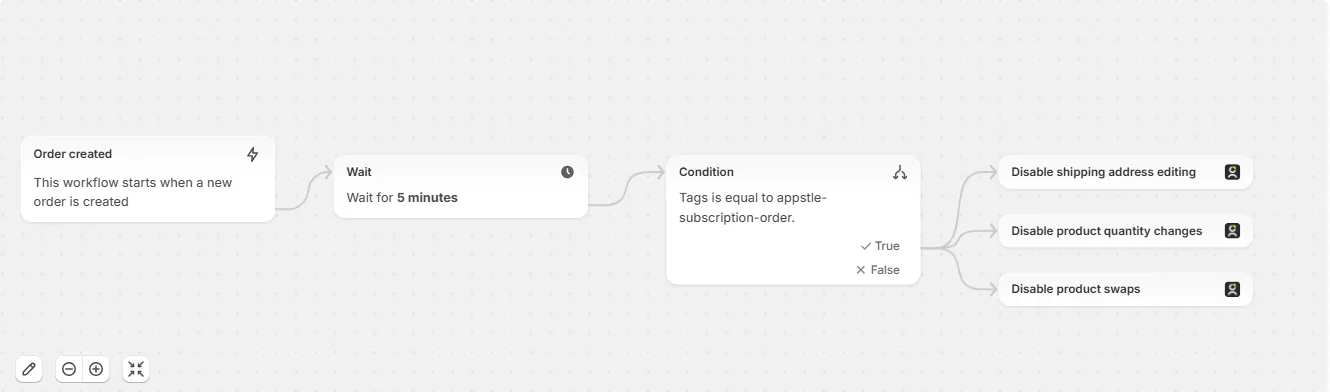
Subscription products often have post-checkout locks enforced by the subscription app.
Common behavior
- Variant changes: usually blocked
- Quantity changes: sometimes allowed
- Attribute edits: app-dependent
- Address or shipping edits: may be allowed
If subscription apps apply tags or metadata, Account Editor can:
- Detect those tags
- Conditionally allow or block edits
5. Other Product Types & Special Cases
Digital products
- Editable unless fulfillment is instant
Pre-orders / deposits
- Editable until fulfillment
- Pricing rules may differ
Gift cards
- Not editable due to Shopify rules
- Customers can still download invoice or contact support
Custom or manual bundles
- Editable only if treated as normal line items
- Behavior depends on pricing and fulfillment setup
6. Restrict Editing Using Tags, Types & Collections
Account Editor allows granular control using:
- Product tags
- Order tags
- Product types
- Collections
Examples:
- Block editing for products tagged
no-edit - Allow editing only for specific collections
- Restrict edits for subscription or bundle product types
7. Fulfillment, 3PL & External Locks
Editing may be blocked when:
- A 3PL or OMS has already synced the order
- Fulfillment workflows lock the order
- External systems overwrite Shopify updates
In such cases:
- Edit options may be hidden
- Changes may not sync externally
See Integration Troubleshooting for details.
8. Real Merchant Scenarios
Scenario A — “Customer can’t edit a subscription item”
Cause: Subscription app lock Fix: Expected behavior; use tag-based rules if supported
Scenario B — “Bundle item edit option is disabled”
Cause: Bundle pricing rules Fix: Restrict editing for bundle SKUs
Scenario C — “Only some items are editable”
Cause: Restricted Using Tag Inside Account Editor Fix: Remove Tag
Scenario D — “Edit options disappeared after sync”
Cause: 3PL locked the order Fix: Review integration timing and rules
9. Recommended Setup (Best Practices)
- Allow editing only for unfulfilled items
- Restrict bundles and subscription products
- Use tags for granular control
- Test edits before enabling globally
- Review 3PL sync timing carefully
10. FAQs
Why can’t customers edit some products but not others?
Product type, tags, fulfillment state, or app restrictions apply.
Can I allow editing for only certain products?
Yes — use tags, collections, or product types.
Why are fulfilled items locked?
Shopify does not allow editing fulfilled line items.
Can I override subscription restrictions?
Only if the subscription app supports editable tags or metadata.
11. Common Issues & Fixes
| Issue | Cause | Fix |
|---|---|---|
| Item not editable | Bundle / subscription | Restrict or expected |
| Partial edit only | Partial fulfillment | Expected behavior |
| Edit disappeared | 3PL lock | Check integration |
| Wrong items editable | Tag rules | Review settings |