
ShipStation & DPD — Delaying Fulfillment for Post-Purchase Edits (Account Editor)
Purpose
Help merchants using ShipStation or DPD Fulfilment ensure that post-purchase edits made via Account Editor are fully completed before fulfillment begins.
This article directly reduces:
- Wrong items shipped
- Address correction failures
- “Edits didn’t apply” support tickets
- Costly re-shipments and returns
Why This Matters
Both ShipStation and DPD Fulfilment can start processing orders immediately after checkout.
If fulfillment begins before the Account Editor edit window ends:
- Product swaps may be missed
- Address changes may be ignored
- Quantity updates may not apply
Account Editor works correctly — but fulfillment moves too fast. The solution is delaying fulfillment until edits are finalized.
How Post-Purchase Editing + Fulfillment Timing Works
Account Editor
- Allows customers to edit orders after checkout
- Applies edits directly to the existing Shopify order
- Can place holds or revert unpaid changes
Fulfillment systems (ShipStation / DPD)
- Import or receive orders on a schedule
- Assume the order is final once received
- Do not wait for post-purchase edit windows by default
You must align the fulfillment delay with your edit window.
ShipStation — Delay Order Import (Recommended)
ShipStation includes a built-in delay feature, making it the easiest integration.
How It Works
- Shopify creates the order immediately
- ShipStation waits before importing the order
- Customers edit their order during this delay
- ShipStation imports only the final version
No Shopify Flow required.
ShipStation Setup (Step-by-Step)
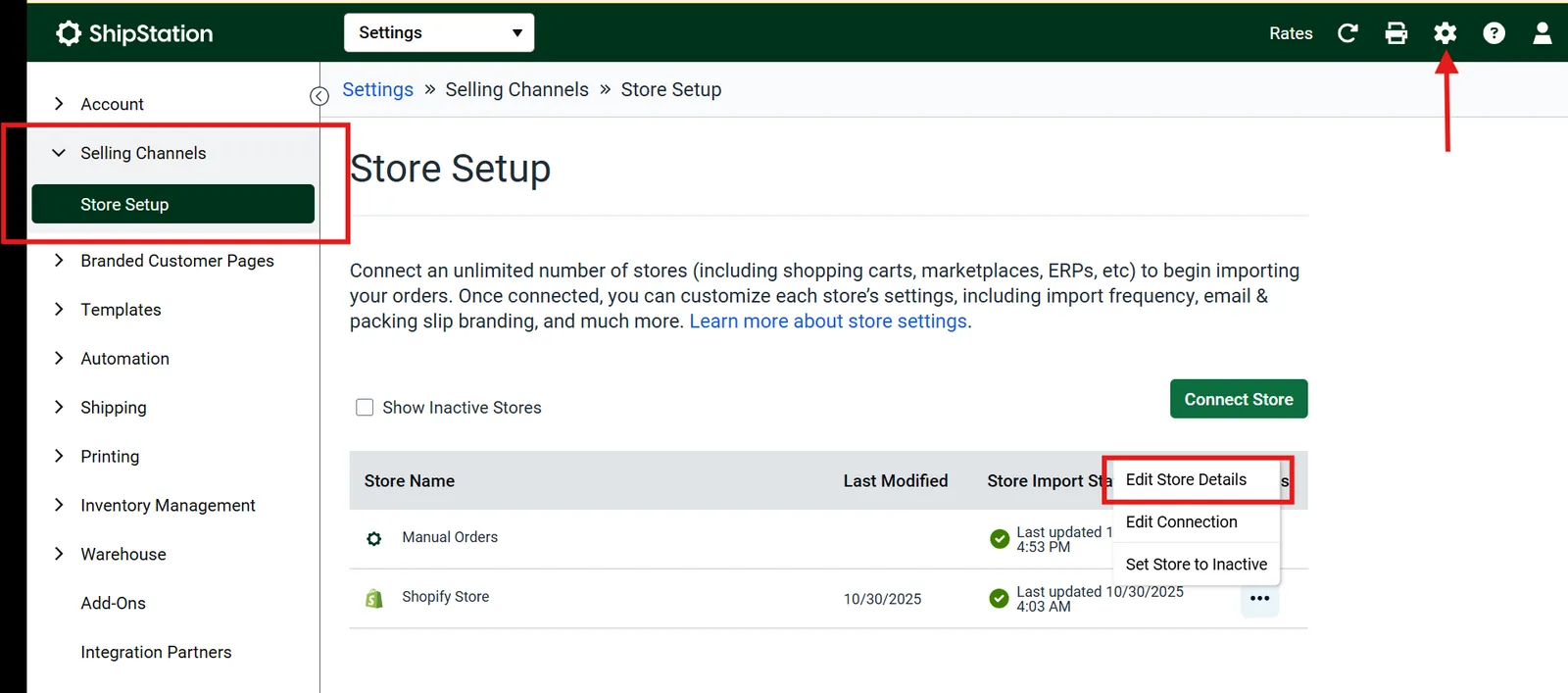
Path in ShipStation:
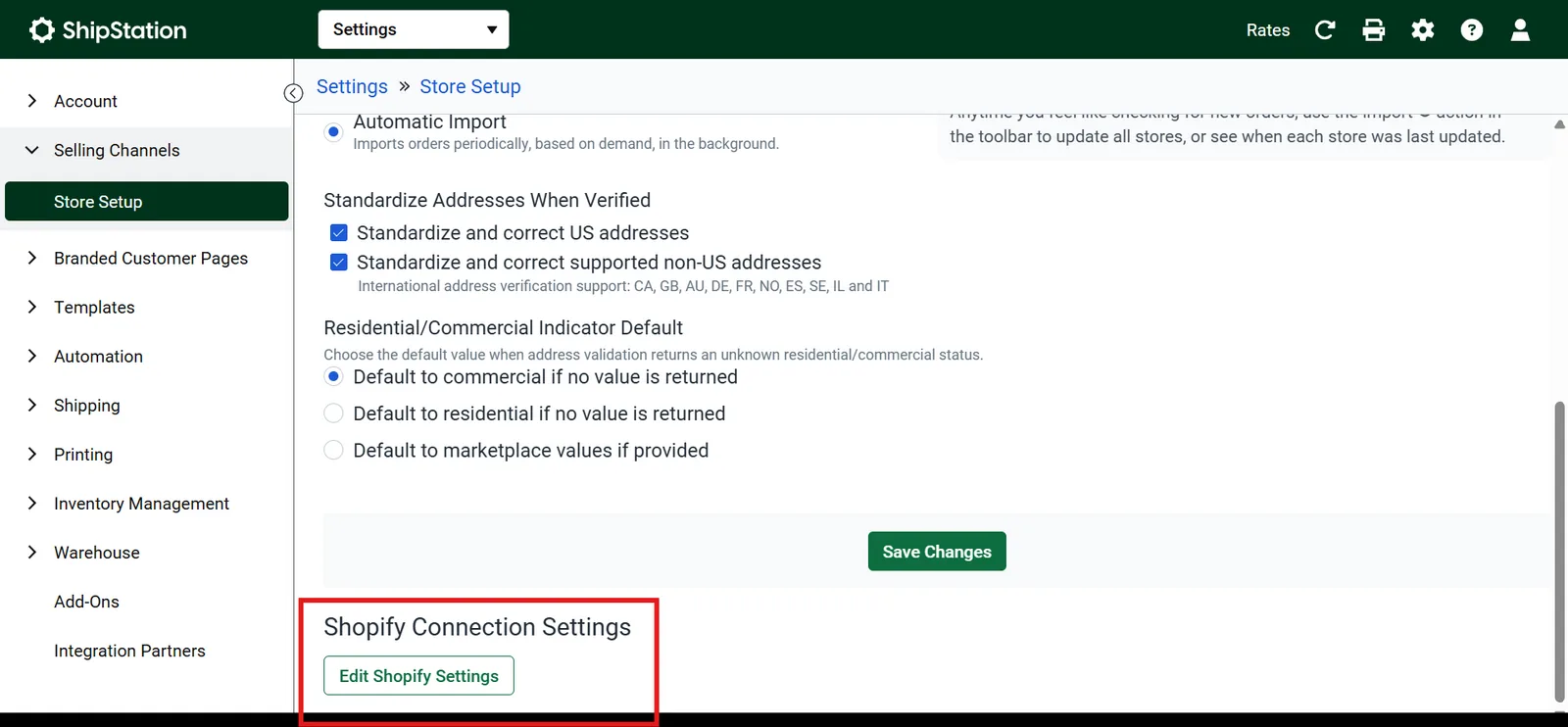
Settings → Selling Channels → Store Setup Select your Shopify store → Edit Store Details Scroll to Shopify Connection Settings → Edit Shopify Settings
Required Setting
| Setting | Value |
|---|---|
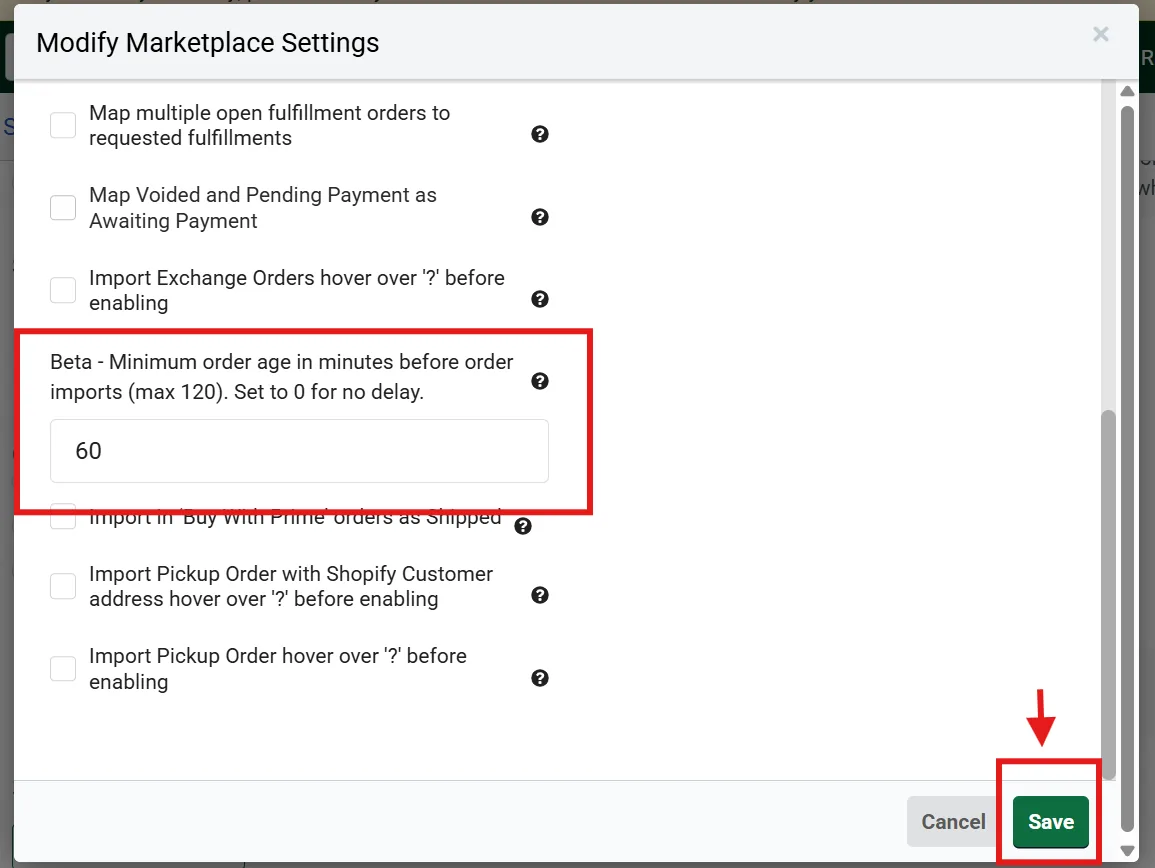
| Minimum Order Age Before Import | Match your edit window (e.g. 60 minutes) |
Example Timeline
| Time | Event |
|---|---|
| 10:00 | Order placed |
| 10:00–11:00 | Customer edits order in Account Editor |
| 11:00–11:05 | ShipStation imports finalized order |
| After | Fulfillment begins |
Result: Fulfillment always receives the edited order.
Common ShipStation Issues & Fixes
| Issue | Cause | Fix |
|---|---|---|
| Edits missing | Delay too short | Increase delay |
| Address incorrect | Imported too early | Match edit window |
| Order imports immediately | Delay not saved | Re-save store settings |
DPD Fulfilment — Delay Dispatch to Match Edit Window
DPD Fulfilment uses a dispatch delay rather than an import delay. This ensures DPD only processes orders after Account Editor finishes editing logic.
Recommended Setup: Account Editor + DPD
Step 1: Configure Account Editor
Path: Account Editor → Settings → Timeframe Set: Edit window: 30 minutes Enable:
- Order holds
- Reverse unpaid order edit
What this does:
- Holds the order if edits increase price
- Reverts edits if payment isn’t completed
Step 2: Configure DPD Delay
Path in DPD Fulfilment:
Settings → General Settings → Delay period
| Setting | Value |
|---|---|
| Delay period | Edit window + buffer (e.g. 31 minutes) |
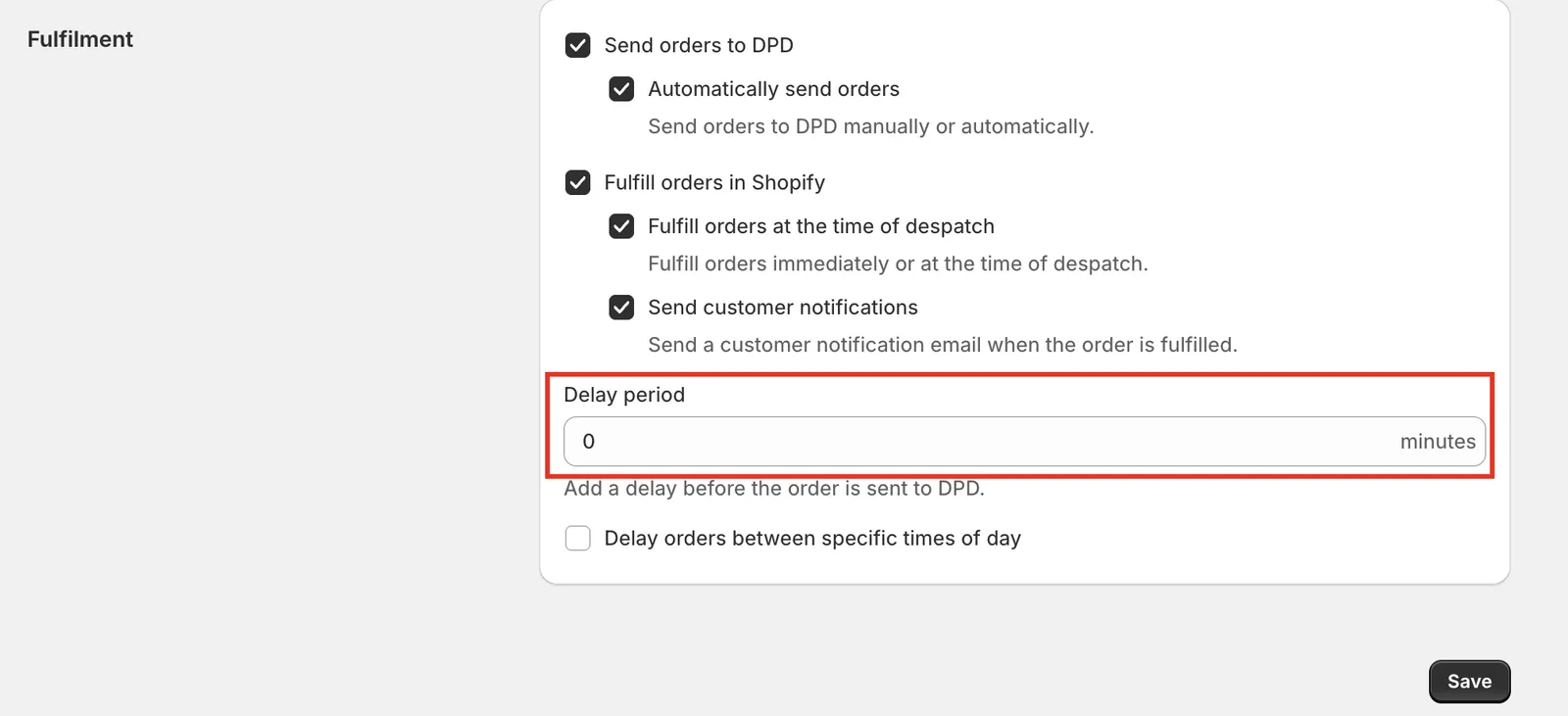
DPD Delay period set to 31 minutes
End-to-End Workflow
Order placed → Edit window active (30 min) → Payment & edit validation → DPD delay expires (31 min) → DPD dispatches final order DPD never sees an order mid-edit.
Best Practices (Highly Recommended)
Always set DPD delay slightly longer than edit window Enable Reverse unpaid order edits
Test with:
- Address change
- Product swap
- Quantity increase
- Confirm DPD receives the updated order
Common DPD Issues & Fixes
| Issue | Cause | Fix |
|---|---|---|
| DPD ships wrong item | Delay too short | Increase delay |
| Edits reverted unexpectedly | Payment not completed | Expected behavior |
| Address still wrong | Edit window expired | Increase window |
Verification Checklist
Before going live:
Edit window set Delay configured (ShipStation / DPD) Order holds enabled Reverse unpaid edits ON Test order edited successfully
Related Guides
Need Help?
If you want us to:
- Validate your setup
- Match delays correctly
- Review fulfillment timing
Contact Account Editor Support with:
- Store URL
- Fulfillment provider
- Edit window duration
We’ll help you lock this down correctly.
Summary
- Fulfillment must wait for edits to finish
- ShipStation → use Minimum Order Age
- DPD → use Dispatch Delay
- Correct timing = fewer mistakes, happier customers