
Quick Start Guide — First Edit, First Upsell
Experience how Account Editor works from your customer’s perspective.
Why This Matters
Before configuring advanced rules, this guide helps you see the real customer workflow end-to-end.
You’ll complete:
- Your first order edit
- Your first address change
- Your first shipping recalculation
- Your first order cancellation
- Your first upsell activation
This “hands-on test” ensures your store is fully ready before going live.
1. What Customers See After Checkout
Account Editor appears automatically on:
Thank You Page (right after checkout)
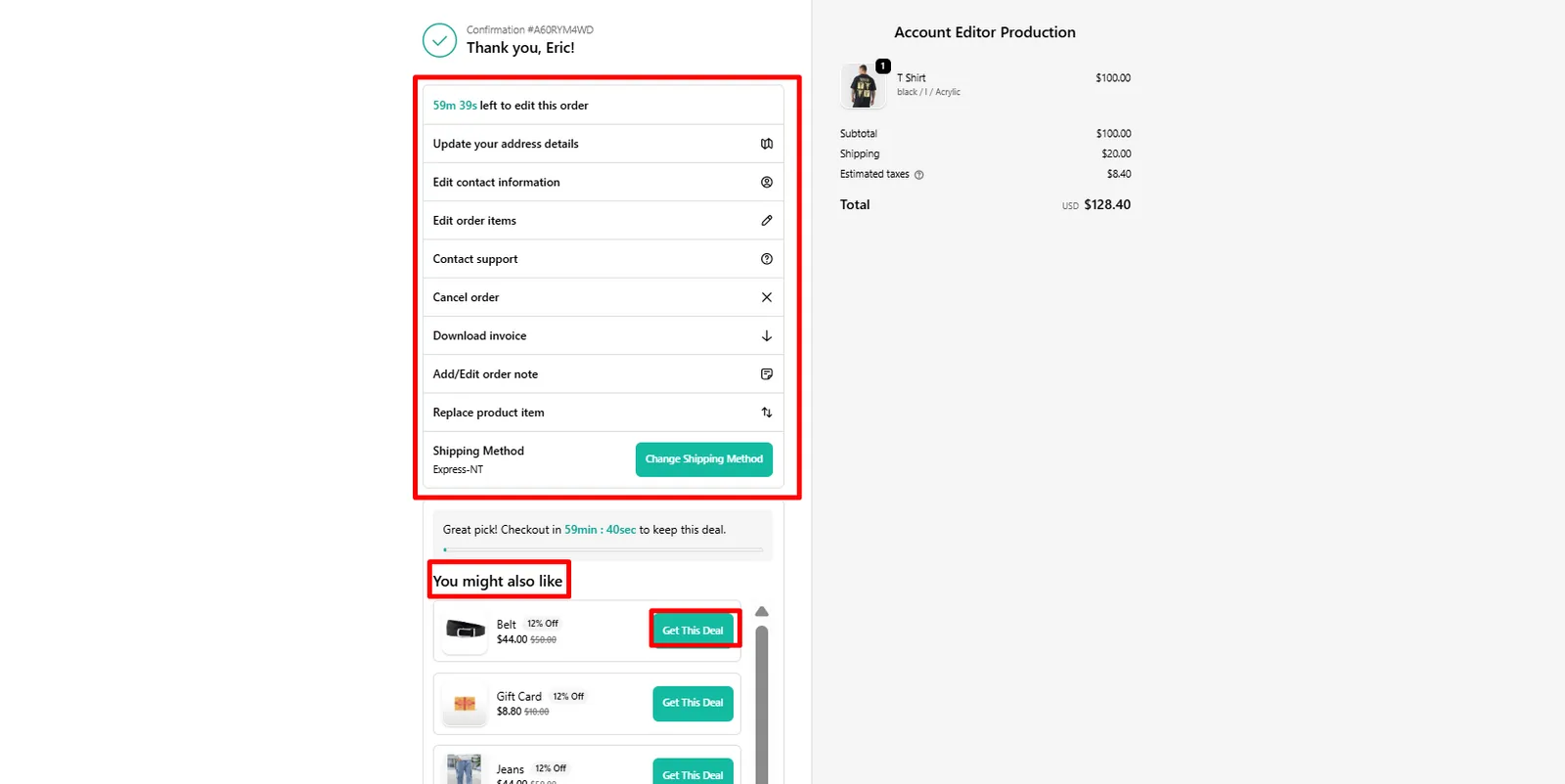
Customers will see:
- Edit Order button
- Add Item / Remove Item
- Change Address
- Change Shipping Method
- Cancel Order button
- Upsell offers (if enabled)
Order Status Page (Redirect From Thank You Page)
Customer workflow:
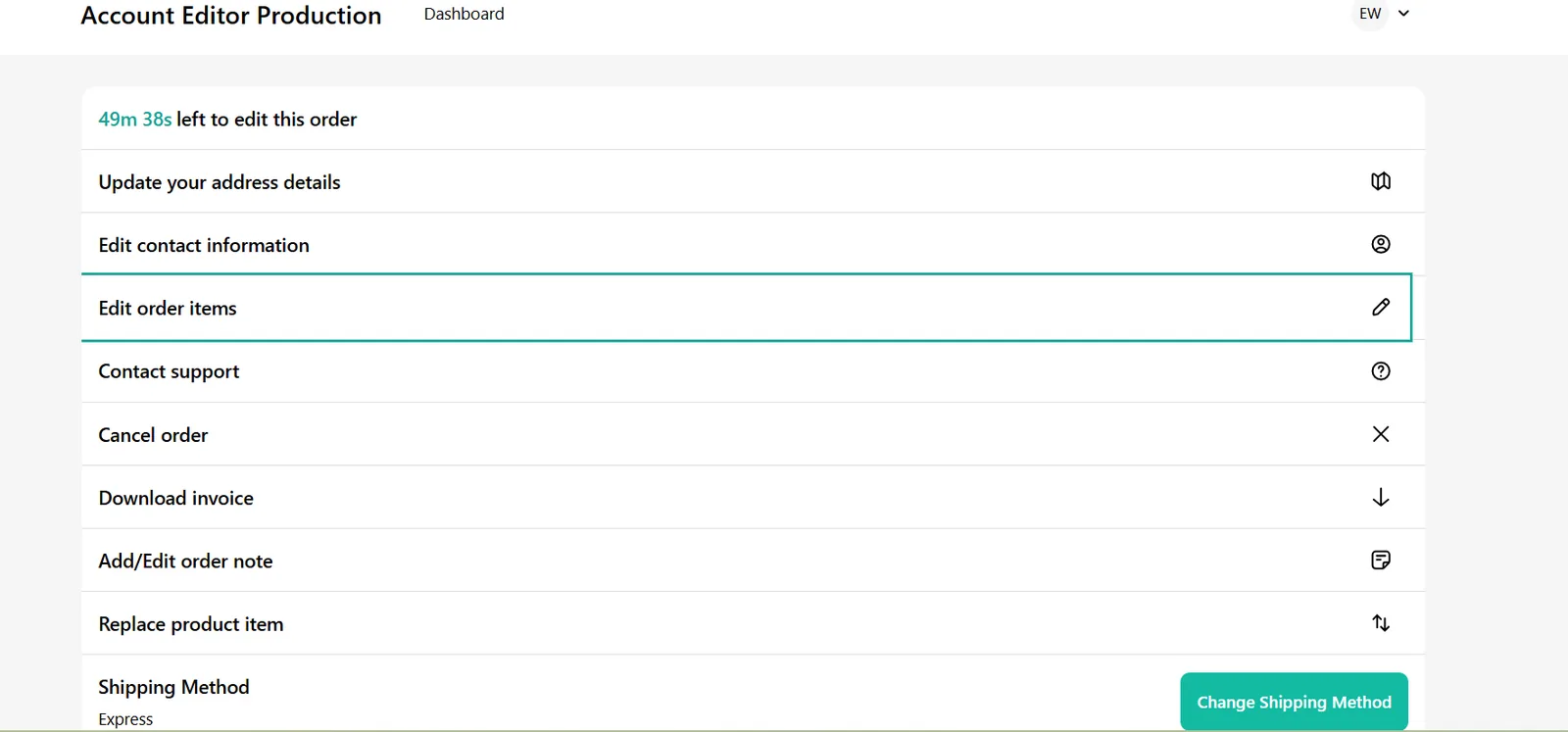
- Click Edit Order
- Widget opens with editable options
- Customer makes changes
- Shopify recalculates totals
- Customer confirms
- You receive timeline updates + optional email notifications
2. Your First Item Edit (Variants, Quantity, Add/Remove)
How to test it:
- Place a test order
- On the Thank You Page → click Edit Order→Redirects To Order Status Page
- Try all four allowed actions:
Change variant
Example: M → L Checks variant mapping + inventory logic.
Change quantity
Validates line-item recalculation.
Remove an item
Tests refund/price decrease scenarios.
Add an item
Tests product picker and upsell compatibility.
Behind the scenes:
- Account Editor modifies the order
- Shopify recalculates tax + shipping
- Final price updates before confirmation
- Nothing is committed until customer clicks Confirm
3. Your First Address Edit
How to test:
- Click Edit Address in the widget
- Modify street, apartment, or postal code
- Confirm address
What to expect:
- Google Address Suggestions
- Shopify validation rules (e.g., postal format)
- Address rules based on your Markets configuration
Account Editor will block address editing when:
- Order is fulfilled
- Address is invalid
- Store does not ship to that country
- Editing Window Time Is Over
4. Your First Shipping Recalculation
Any of the following will trigger shipping recalculation:
- Changing item quantity
- Changing variants (weight changes)
- Removing/adding items
- Changing shipping address
Shopify recalculates rates, NOT Account Editor
This includes:
- Carrier-calculated rates
- Market-based rates
- Rule-based shipping profiles
- Free-shipping thresholds
If shipping becomes $0 / ₹0
Common causes:
- No matching rate in your shipping profile
- Any Discount Condition Is Applied Which Is Active On Store
- A discount code that includes free shipping
- An automatic discount that unlocks free shipping after edits
- A spend threshold (“Free shipping above $50”)
- Market-based free shipping rules for certain countries
- Customer tag–based free shipping
- Market rules conflict
(This is explained later in the Shipping Editing article.)
5. Your First Cancellation
Let customers test the cancellation flow:
How to test:
- Open the test order
- Click Cancel Order
- See restocking fee (if enabled)
- Order is canceled automatically
Cancellation is blocked when:
- Order is already fulfilled
- Order is partially fulfilled
- You disabled this option in settings
6. Your First Upsell (Instant Activation)
Enable the upsell engine:
- Open Account Editor
- Go to Upsell Engine
- Turn it ON
- Create a simple offer (e.g., “Add Socks for $5”)
- Save
Now test:
- Place a new test order
- Go to Thank You Page
- Upsell should appear instantly
What to check:
- Product image & price
- Discount (if applied)
- Conversion event (when customer accepts)
Best practice:
Use a low-cost product as your first upsell — they convert best.
7. Recommended Default Settings for New Stores
Turn ON these to get the best early results:
- Allow item editing
- Allow address editing
- Enable cancellations before fulfillment
- Enable default upsell block
- Set edit window to 10–30 minutes
8. Go-Live Checklist
Your store is fully ready when:
App Embed is enabled
Account Editor block is added (TYP + OSP)
You placed a test order
Item editing works
Address editing works
Shipping recalculates correctly
Cancellation flow works
Upsell appears and functions
Timeline notes appear in Admin
Notification emails work correctly
Real Merchant Scenarios
Scenario A — “Customer can't see the Edit button”
Likely cause: App Embed disabled Fix: Online Store → Customize → App Embeds → enable Account Editor
Scenario B — Editing works on TYP but not on Order Status Page
Cause: Block added only to TYP Fix: Add block to OSP too
Scenario C — Shipping prices look wrong
Cause: Shopify shipping profiles returning unexpected rate Fix: Check your shipping rules; weight or zone may have changed
Scenario D — Upsell not appearing
Cause:
- No offer configured
- Product unavailable
- Product restricted
Fix: Review Upsell Engine setup
Best Practices (Recommended for All Stores)
- Use simple products for first upsell
- Keep edit window short (10–20 min)
- Avoid allowing edits after fulfillment
- Enable restocking fee to prevent abuse
- Encourage customers via email to “Review or Edit Order”
FAQs
Q: Do customers need an account?
A: No — guest checkout fully supported.
Q: Can I disable some edit options?
A: Yes. You can limit item edits, address edits, cancellations, and shipping edits.
Q: Does this affect checkout?
A: No. Checkout is untouched. Account Editor only shows on post-purchase pages.
Q: Does this work with subscriptions?
A: Some subscription apps restrict edits. See “Editing Eligibility” article.
Common Errors & How to Fix Them
| Issue | Cause | Fix |
|---|---|---|
| Edit button missing | App Embed off | Enable under App Embeds |
| Upsell not showing | No offer configured / product unavailable | Create or update offer |
| Shipping is wrong | Shopify recalculation returned no matching rate | Check shipping profiles |
| Order edit fails | Item restricted or fulfillment lock | Adjust eligibility rules |